Uptime Monitoring
Monitor an MCP Server
Cronitor uptime checks can monitor a network-accessible Model Context Protocol (MCP) server by sending a safe JSON-RPC request and asserting on the response. This verifies more than an open port: it can prove that protocol routing, authorization middleware, and the tool-list endpoint are responding.
Check reachability first
Cronitor checks originate from public probe locations. Before creating a check, confirm that the target has public DNS and is reachable from outside your laptop, VPC, VPN, or private LAN.
Choose the pattern that matches the target:
- Public HTTPS endpoint: check it directly. Require TLS and expose only the smallest protocol surface you need.
- Public endpoint restricted by firewall: turn on Use Static IPs for Checks in account settings and allow the addresses at cronitor.io/ips.txt. Static addresses are published for US West, US East, EU West, and EU Central. The free plan cannot enable this. Leave the check's regions unset to use your account defaults. Details are in Website & API monitoring.
- Private endpoint that may be tunneled safely: publish only a health or protocol endpoint through your normal authenticated ingress.
- Endpoint that must remain private: do not open it for a probe. Run the request inside the private network and report the result with a heartbeat or job monitor. See Monitoring Private Endpoints and APIs.
Checks cannot probe a stdio MCP server because it has no network endpoint. Monitor the process that launches it with a heartbeat or job monitor instead.
The examples below use the Monitor API and create or update the same monitor key when rerun. Replace every *.example.com value. Copy your existing SDK Integration key from API Settings, but never put the secret directly in a command or shell history. The non-echoing prompt below is for a temporary Bash or Zsh session (read -s is not portable POSIX shell syntax).
Probe an MCP server with tools/list
An HTTP MCP server should do more than accept a TCP connection. Send a JSON-RPC tools/list request and assert that the response is successful, uses JSON-RPC 2.0, and contains the tool list.
MCP revision 2026-07-28 uses a stateless core: each request carries the protocol version and client capabilities in the body's _meta, with matching MCP-Protocol-Version and Mcp-Method headers. Use the recipe below only for a server whose documentation explicitly says it supports MCP 2026-07-28 and this stateless request shape. Do not infer support from the presence of an HTTP MCP endpoint. Legacy servers can reject tools/list before initialize.
printf 'Paste the SDK Integration key: ' >&2
IFS= read -r -s CRONITOR_API_KEY
printf '\n' >&2
export CRONITOR_API_KEY
curl --fail-with-body --silent --show-error \
  --user "$CRONITOR_API_KEY:" \
  --header 'Content-Type: application/json' \
  --header 'Cronitor-Version: 2025-11-28' \
  --request PUT \
  --data '{
    "monitors": [{
      "type": "check",
      "key": "mcp-tools-list",
      "name": "MCP tools/list",
      "schedules": ["every 5 minutes"],
      "request": {
        "url": "https://mcp.example.com/mcp",
        "method": "POST",
        "headers": {
          "Accept": "application/json, text/event-stream",
          "Content-Type": "application/json",
          "MCP-Protocol-Version": "2026-07-28",
          "Mcp-Method": "tools/list"
        },
        "body": "{\"jsonrpc\":\"2.0\",\"id\":1,\"method\":\"tools/list\",\"params\":{\"_meta\":{\"io.modelcontextprotocol/protocolVersion\":\"2026-07-28\",\"io.modelcontextprotocol/clientInfo\":{\"name\":\"cronitor-uptime-check\",\"version\":\"1.0.0\"},\"io.modelcontextprotocol/clientCapabilities\":{}}}}"
      },
      "assertions": [
        "response.code = 200",
        "response.body contains jsonrpc",
        "response.body contains tools"
      ]
    }]
  }' \
  https://cronitor.io/api/monitors
unset CRONITOR_API_KEY
This is an ordinary HTTP check. The same request, headers, body, and assertions can be entered in the app's check form, and the monitor is labeled with the http platform.
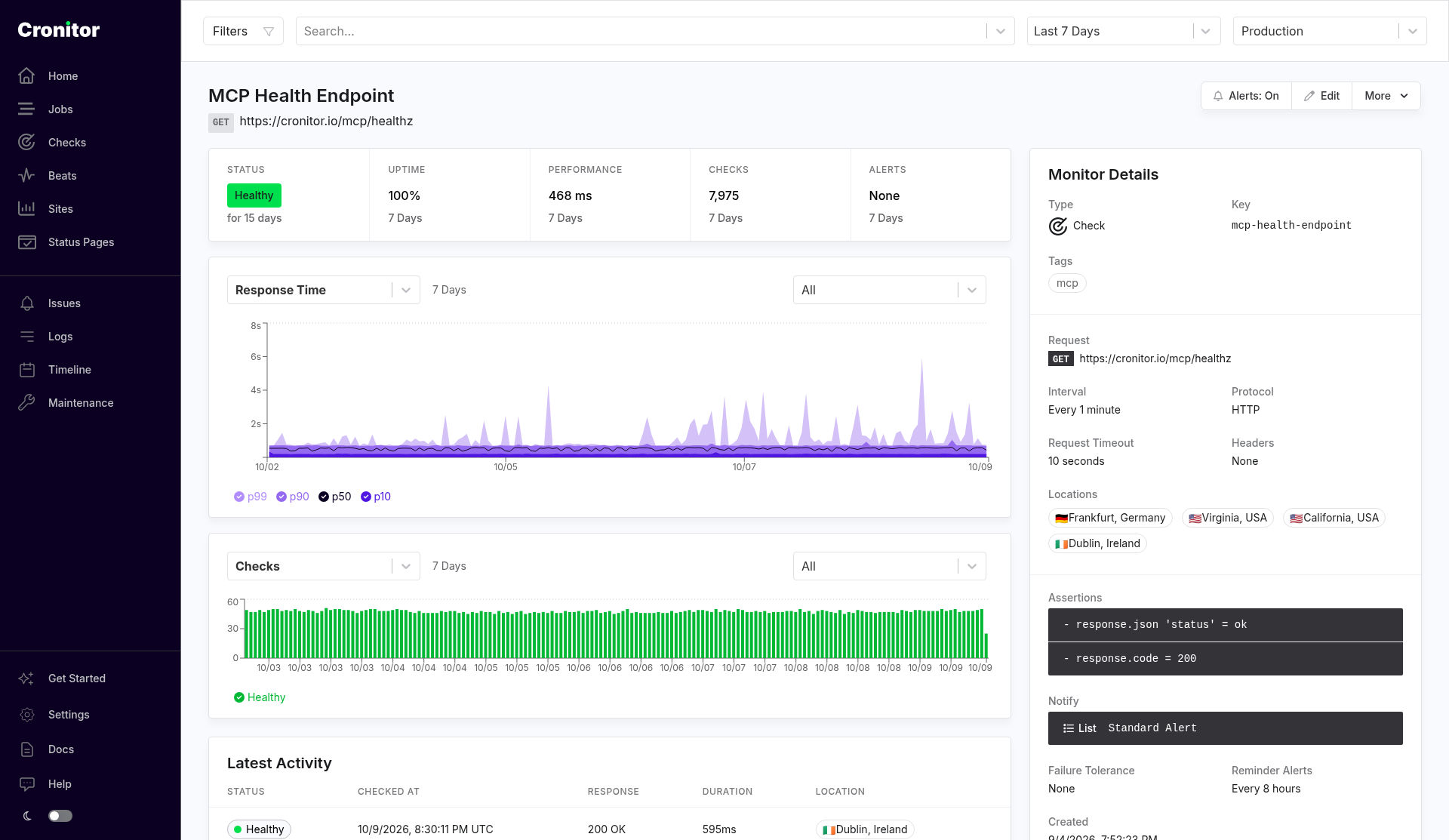
The screenshot is a GET health check for a public MCP URL. Use it as the pattern for where response time, status, and assertions show up. Enter the tools/list recipe as a POST in that same form, with the headers and body from the example. A dedicated health URL is the simpler check when the server publishes one.
The key is read from the environment and never appears in the command itself. Run unset CRONITOR_API_KEY after the request, including if you interrupt the example before its final line. The JSON assertion value is intentionally unquoted inside the assertion string. Cronitor compares it with the decoded JSON value.
If the endpoint returns text/event-stream, Cronitor's JSON assertions cannot inspect the SSE envelope. Keep the response-code assertion, replace the response.json assertion with response.body contains jsonrpc, and use body assertions or a dedicated JSON health endpoint for deeper validation.
Probe a legacy MCP server with initialize only when explicitly safe
Do not use a recurring raw initialize request as a general legacy-server health check. A legacy Streamable HTTP server may create an Mcp-Session-Id for the response. A conforming client may then need to retain that identifier, send an initialized notification, include the identifier on later requests, and explicitly delete the session when finished. Cronitor uptime requests do not retain protocol state between runs, so a repeated initialize probe can leave abandoned sessions on the target.
Prefer a dedicated health endpoint for a legacy server. For an authorization-protected endpoint, you can instead verify the unauthenticated HTTP boundary returns the documented 401 response, without starting the MCP lifecycle.
Use initialize only when the server's own documentation explicitly guarantees that the request is sessionless, or that any session has a short bounded expiry and requires no client cleanup. Build that exceptional probe from the documented protocol version and lifecycle behavior; do not copy the modern stateless payload above into a legacy request.
Add authentication for a protected MCP server
Use a dedicated, least-privilege service token that remains valid for unattended probes. Store and rotate it with your other service credentials, and add it to the request headers in the tools/list check:
"Authorization": "Bearer YOUR_MCP_SERVICE_TOKEN"
Cronitor sends the header only to the URL configured for that check. Do not place secrets in the URL, monitor name, assertions, or tags.
Treat 401 Unauthorized as proof of life
You can verify that an OAuth-protected MCP endpoint, DNS, TLS termination, routing, and authorization middleware are alive without storing a token. Send the same tools/list request without credentials and replace the success assertions with:
"assertions": ["response.code = 401"]
A passing 401 check proves only that the protected HTTP boundary responds. It does not prove that a token can authenticate or that the server can return its tool list. Run a separate authenticated check when you need that stronger guarantee.
Alert before TLS expires
Every HTTPS check verifies the certificate by default. Add an explicit expiry assertion when you want warning before an MCP server certificate reaches its renewal window:
ssl_certificate.expires_in > 30 days
Choose a threshold longer than your certificate renewal and incident-response window. Keep SSL verification enabled; an expiry warning is not useful if the check accepts an invalid certificate.
Verify the check end to end
After creating the monitor, open it in Cronitor and run a test against the real target. Confirm the request method, headers, and body are safe to repeat, then test the alert path:
- Point a staging copy at a closed port or temporary failing endpoint and confirm Cronitor opens an issue.
- Restore the target and confirm the monitor recovers.
- For a protected server, test the unauthenticated
401boundary and authenticatedtools/listchecks separately. - Attach the intended notification list before relying on the monitor in production.
To have a compatible client create this check for you, connect it to the Cronitor MCP server and use the setup_monitor tool as a normal check: pass the url, method (POST), headers, body, and assertions from the example above.